
Everybody probably knows how to sidechain “pump” bass, lead, pad, and everything, but what if you want to sidechain only some specific frequency range – i.e low frequencies? In this tutorial, I will show you how.
What’s the benefit of sidechaining only a portion of the frequency range? Less pumpy music while still getting the advantage that the lower frequencies of bassy sounds aren’t clashing with the bass of the kick (though this isn’t a benefit if you WANT your music to pump). Let’s say you have a bass sound covering a wide frequency range and you sidechain it to your kick in a traditional way: the whole bass sound will pump when the kick hits (depending on your compressor settings of course). But when you set the sidechain to be active – i.e – in the lower frequency range, only the low end will “duck” and the rest of the frequencies stays intact.
Ok. Here’s how to apply this method:
Let’s assume that you want your kick drum to be the sound that will trigger the sidechain effect on your bass sound. In that case – assuming you have assigned kick and bass each to their own Mixer tracks – drop a Fruity Peak Controller to the kick drum’s effect slot and Fruity Parametric EQ 2 (or your favourite EQ plugin) to the bass sound effect slot.

Now, in the PEQ2, set the frequency value. Use low shelf filter (if you are using the default preset of PEQ2, low shelf filter is the band 1). The higher you set the frequency, the wider the range in the frequency spectrum the sidechain “duck” will affect. If you want to dip only the low frequencies, set it to around 100-150Hz.

Next, right click on the Band 1 level controller and choose “Link to controller…” from the menu.

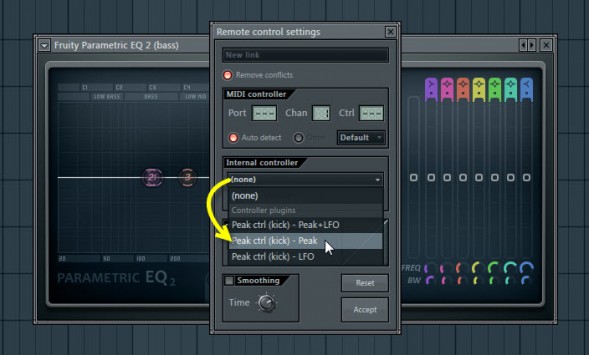
Now, link the PEQ2 low shelf frequency volume slider to Peak Controller by choosing ‘Peak’ under the ‘Internal controller’ menu.

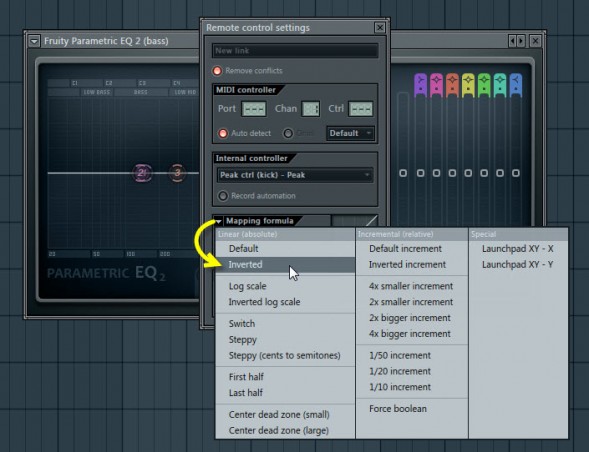
Under the ‘Mapping formula’ select ‘Inverted’. This sets a mapping relationship between the controller and the target control so that the increases in the controller value decreases the target controller – in other words, we’ll get a dip in the PEQ2 low shelf filter frequency volume every time the kick hits.

Now, in the Peak Controller, disable the ‘Mute output’ to hear the kick. Set the ‘Peak base level’ to 50% (this sets the PEQ2 low shelf filter volume level to 0.0dB). Set the ‘Peak amount’ to 200% (this drops the PEQ2 low shelf filter volume level to -18dB every time the input signal – kick – hits).

And that’s it.

TIP: lower the ‘Peak amount’ value in the Peak Controller if you don’t want the volume dip to be so drastic.
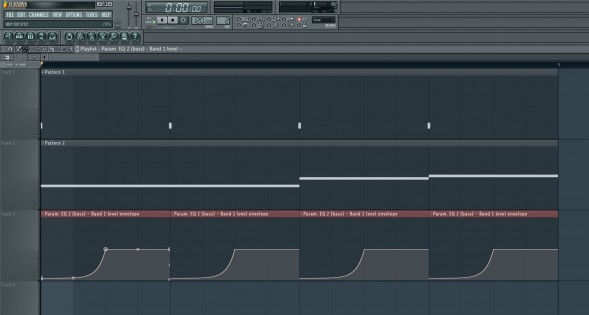
There’s also a faster way for this method where you don’t need to use the Peak Controller at all: just use automation clip on the PEQ2 frequency level slider to manually draw the dipping curve.




The end.
Watch the video version below:

No comments:
Post a Comment